All you need to know about SIM cards
In this article
Where can I get a 2degrees SIM?
You can pick up one of our standard SIM cards from the following places:
- 2degrees stores
- Noel Leeming
- The Warehouse
- Warehouse Stationery
- PB Tech
- JB Hi-Fi
- Harvey Norman stores
- 2degrees Online - available with Prepay plans
- Your local supermarket or petrol station may also stock our SIM cards.
You can also choose eSIM if your device supports it:
- No physical SIM required
- Simply set it up by downloading it to your device
- Buy online now
- Learn more about eSIM
How do I activate my SIM?
Physical SIM
- Turn off WiFi on your phone
- Pop the SIM into your phone
- You should receive a Welcome message from 2degrees
If you don't receive a text, call 200 and follow the prompts.
eSIM
- Activate by downloading the eSIM onto your device using a QR code or activation details
- A stable internet connection is required during setup
Where do I find my SIM serial number?
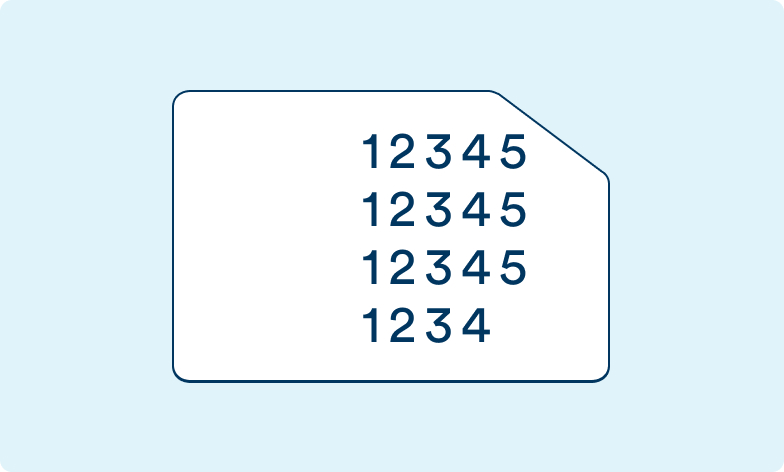
Physical SIM card:
SIM Card: On the actual SIM card (opposite side to the chip) or on the pack it came in (under the barcode).
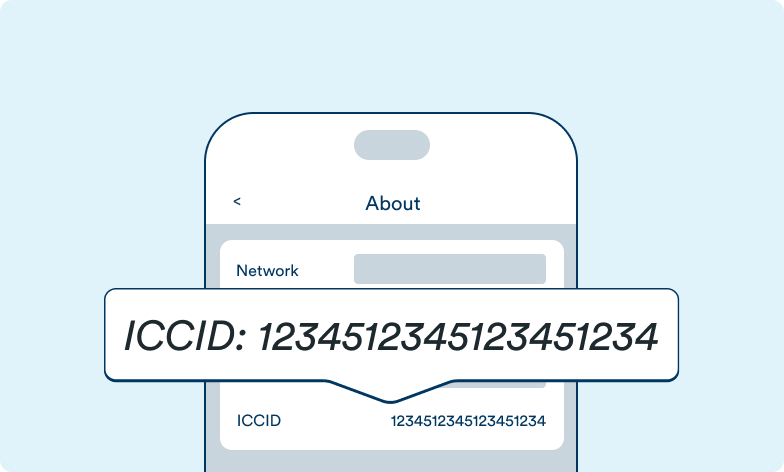
iPhone: Go to Settings > General > About > ICCID
Android: There are many types of Android devices and no one way to retrieve a SIM number. We recommend checking your device’s manual or downloading a SIM management app.
eSIM:
iPhone: Go to Settings > General > About > ICCID
Android: Go to Settings > About or About Device > IMEI information
Samsung: Go to Settings > Connections > SIM Card Manager > eSIMx > More Information
I have a SIM from another New Zealand network, can I keep my number?
You absolutely can – as long as your number isn’t blocked and your SIM card with your phone number has been active in the last 12 months.
Bring your mobile number to 2degrees from another network here
How do I move my SIM data to another SIM?
SIM Swap is when you transfer the number from your old SIM to a new SIM.
You’ll need to do a SIM Swap when:
- You get a new phone that needs a different sized SIM
- You’ve lost or broken your current SIM
- Follow our step‑by‑step guide to help you complete your SIM Swap.
Before you get started:
- Make sure you’ve got a SIM Swap SIM from one of the retailers listed above. You’ll need this to complete your SIM Swap.
- Contacts saved directly to your old SIM won’t transfer across. If you still have your old SIM, back them up first so nothing is lost.
I’ve lost my phone with my 2degrees SIM card in it, can I keep my number?
If you’ve lost your phone with an active SIM card in it, you can keep your original number and any credit that you had on it.
Here’s what you need to do:
1. Immediately suspend your SIM Card to stop anyone else from incurring charges under your account.
- Log into My 2degrees account
- Click on Mobile on the menu and select your mobile from the dropdown (if multiple).
- Scroll down to Settings and click on ‘Pause or resume a mobile number’
- Confirm by clicking Pause Number
- The page will load for a couple of seconds
- Your number will be suspended from use
2. Buy a SIM Swap SIM from one of the retailers listed above.
3. Follow our instructions for SIM swap
I’ve changed phones and need a blank Micro or Nano SIM
If you have a standard 2degrees SIM and want to swap it for a Micro or Nano SIM to fit your new phone or iPad, you’ll need a blank Micro or Nano SIM Swap SIM.
SIM Swap SIMs cost $5 and are available at your nearest 2degrees store. Once in store, ask our friendly staff to help move your existing number and account credit onto your new SIM.
My SIM card is faulty, what can I do?
If your current SIM is faulty, we’ll replace it with a blank SIM free (not a standard 2degrees SIM). Pick up a new SIM your nearest 2degrees store. Once you have this SIM, our friendly staff can help you move your existing 2degrees number to a new SIM card. Have 2 forms of ID and your PIN handy for quick and easy assistance.


