Bring your number to 2degrees
You can keep your current New Zealand mobile number when you join 2degrees, even the 021 or 027 bit. It’s free and only takes a few hours for us to get you up and running.
There are three easy ways to bring your number: online, our app or in a 2degrees store.
Whichever way you choose, you’ll need your active 2degrees SIM card as well as your old account number (if you were on a monthly plan), or SIM number (if you were on a prepaid plan).
Joining as a Business customer? Your Business Sales Consultant will walk you through the process for keeping your numbers and set a date for when to transfer them across.
Things to know before you bring your number to 2degrees:
- Number transfers usually take up to 24 hours.
- You’ll need to be the authorised account holder (or have it transferred to your name first).
- Still in contract? You might need to pay early exit fees so make sure to check with your previous provider.
- Your number needs to be active with your current provider for the transfer to work.
- Don’t forget to back up and save your contacts and any SIM stored info to your phone or the cloud so nothing gets lost when you make the switch.
What you need to bring your number
Before you start, you'll need:
- Internet access
- An active 2degrees SIM. To activate your SIM simply insert it, call 200 for free and follow the prompts
- Info from your old provider:
- Pay Monthly customers need their latest bill (That’s where you’ll find your account number)
- Prepay customers need their SIM card number
Need help finding your SIM card number? Learn more here.
Once you’re ready:
Simply go to My 2degrees and register using the temporary 022 number on your new SIM.
How to bring your number in the app or My 2degrees
1. Log in to your account
On the 2degrees NZ app:
- Log in to the app.
- Select your 022 number from the dropdown (if you have multiple).
- Scroll to the bottom and tap on “Bring your number”.
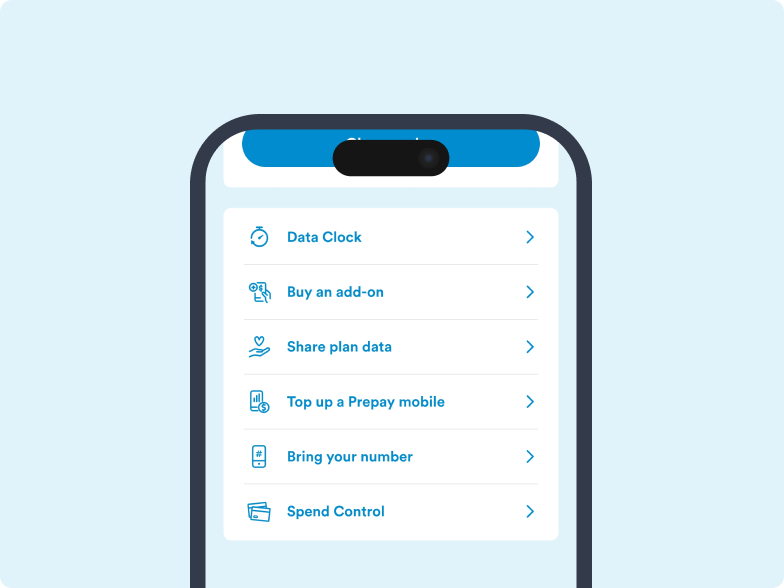
On My 2degrees:
- Log in to My 2degrees.
- Click on Mobile at the top right navigation.
- Select your 022 number from the dropdown (if you have multiple)
- Scroll to Settings and click on “Bring your number”.
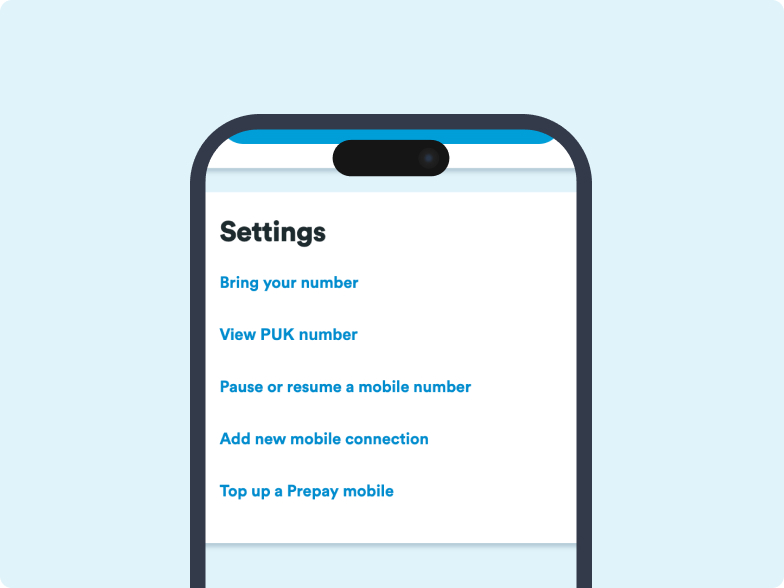
2. Enter your old account details or your SIM serial number
- Your 2degrees details should be pre-filled, double check these are correct.
- Enter the details of the provider you’re leaving.
3. Start the transfer
- Read and accept the Terms and Conditions.
- Select "Bring my number".
4. Confirm by SMS
After you submit your transfer request, you should get a text message from NZ Telecommunication Forum (TCF) to confirm your request to move your mobile number.
- Make sure your old SIM/eSIM from your previous provider is in your phone.
- Reply ‘YES’ to the text from 2542 (NZ Telecommunications Forum) within 2 hours.
- After replying, you can swap back to your 2degrees SIM.
Mobile port confirmation text
To move your number to 2degrees, reply YES to the confirmation text sent by the NZ Telecommunications Forum (TCF) from 2542. It will go to your previous provider’s SIM, so make sure your old SIM is still in your phone.
Whether you reply YES or NO, you will then receive a text message to confirm either response.
The mobile confirmation text may take up to 48 hours. It will be sent between 8am to 5pm during working days.
Note: In some cases, you may not receive a text if there are other approvals still needed, such as with large business number transfers.
Bring your number in store
Before you visit our 2degrees staff in store, make sure you have these things with you:
- Your 2degrees SIM (or purchase one in store).
- Your old account number or SIM number.
- A couple of minutes to go through the Terms and Conditions.
- 2 forms of ID (one photo and another with your name on it)
What happens after you start the number transfer?
- You will receive a confirmation text with a reference number
- Keep this reference number handy if you need support
- Once approved, the changeover usually takes 2 to 24 hours during 8am to 6pm
- We will text you when the change is complete
- Requests made after 5.45pm will be processed from 8am the next day
FAQs
- Once your request is approved, the changeover usually takes between 2 and 24 hours. Doing it online is often the quickest way.
- Check your details carefully before submitting, as incorrect info can slow things down. Timing can vary because we need to work with your previous provider.
- We will text you once the change is complete. Make sure your 2degrees SIM is in your phone, or pop it in every few hours to check.
If you still need a hand, call us on 0800 022 022.
Your credit or balance with your previous mobile provider will not transfer to your new 2degrees account.
If you still get a Pay Monthly bill from the other guys after you’ve transferred your number, you’ll need to call them to check that they've closed your account properly. For legal reasons, 2degrees can't do that bit for you.
If you've recently brought your number to 2degrees, it can take a little time for services like iMessage and RCS to fully update.
Before you start troubleshooting:
- Check that your number transfer is complete (this can take up to 24 hours)
- Allow up to 48 hours after your number transfer for all services to activate.
- Turn Airplane Mode on for 10 seconds, then turn it off again.
iMessage not working?
Try these steps on your iPhone:
- Go to Settings > Messages > Send & Receive and check that your transferred mobile number is selected.
- Turn iMessage and FaceTime off, then back on.
- Sign out of iMessage and sign back in again.
- Check that your phone's Date & Time, My Number, and Send as SMS settings are correct.
RCS not working?
Try these steps on your Android device:
- Go to Settings > Apps > Messages > Storage & cache.
- Select Clear cache, then Clear data.
- Reopen the Messages app and sign in again if prompted.
- Check that your transferred mobile number is being used for RCS chats.


